 p2p-after-loan
# Welcome to huaxia-p2p-loanafter-web
技术栈 vue^vue + vuex^vuex + vue-router^vue-router + axios^axios + svg-icon^svg-icon
# 你必须知道的步骤
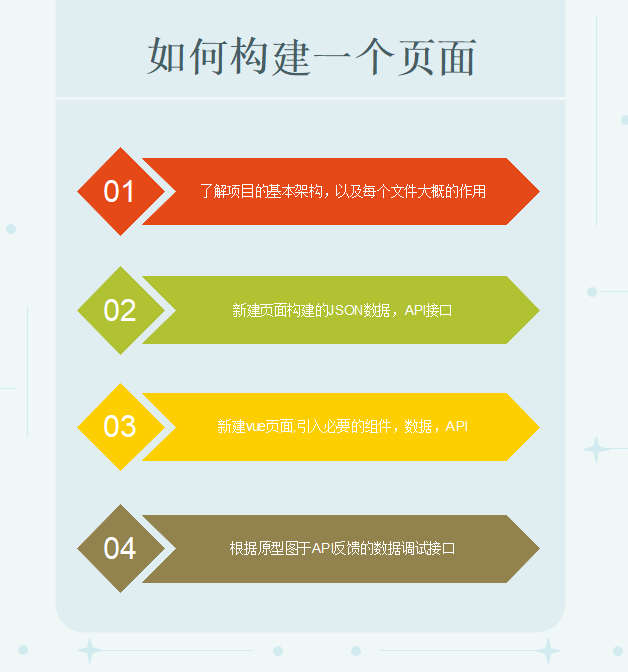
##项目起始于
此项目起始构建于车贷项目,技术起源基于element-UI + vue-cli ,于信贷催收,车贷催收,征信报表,,征信管理中心,车贷贷后。 经各个系统原型提炼,划分为主功能模块为【选项卡模块】,【搜索模块】,【表格模块】,【表单模块】,【个人信息模块】
# 如下图1:
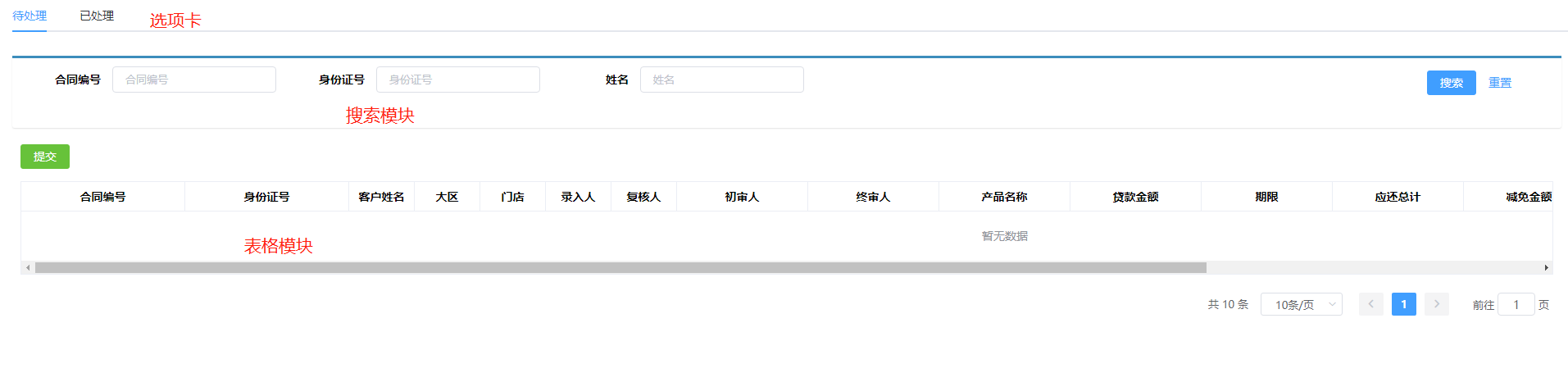 图2:
图2:
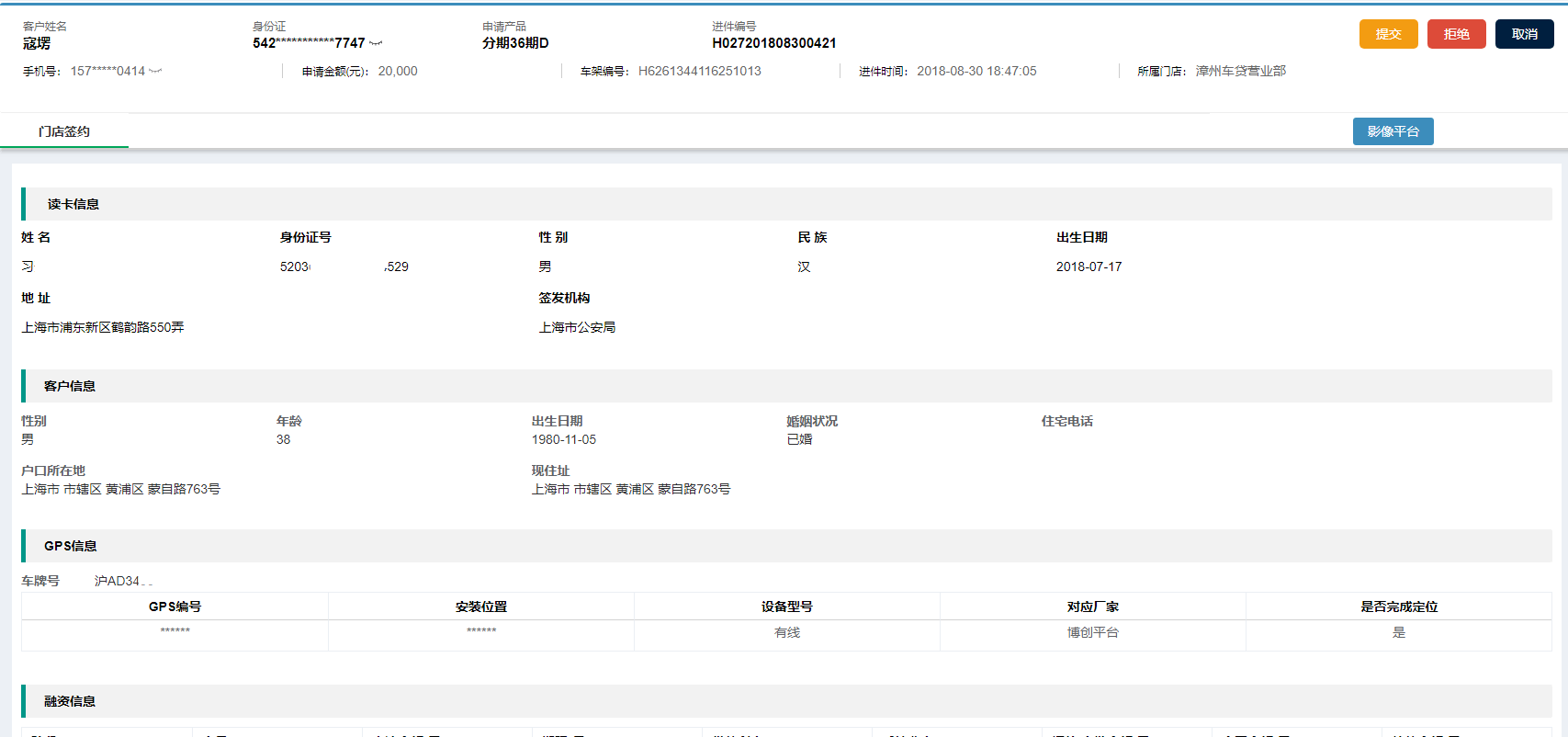
# 项目特点
快速的构建后端系统
优点:
- 页面构建采用JSON,动态构建,前期敏捷开发很快.
- 页面渲染根据tableLabel.json来渲染表格,searchLabel.json来渲染查询框,组件初始化加载searchLabel.json and tableLabel.json,通过hx-table组件来构建页面
缺点:
- 缺少灵活机动性,快速构建的基础需要在hx-table组件内包含,否则需要重新定义
- 下拉菜单的值,建议使用静态数组
##项目目录结构
├── build // 构建相关
├── config // 配置相关 ├── src // 源代码 │ ├── api // 所有请求 │ ├── assets // 主题 字体等静态资源 │ ├── components // 全局公用组件 │ ├── icons // 项目所有 svg icons │ ├── lang // 国际化 language │ ├── router // 路由 │ ├── store // 全局 store管理 │ ├── styles // 全局样式 │ ├── utils // 全局公用方法 时间日期转化 表单验证 req拦截器等 │ ├── views // view │ ├── App.vue // 入口页面 │ ├── main.js // 入口 加载组件 初始化等 │ └── permission.js // 权限管理 ├── static // 第三方不打包资源 │ └── Tinymce // 富文本 ├── .babelrc // babel-loader 配置 ├── eslintrc.js // eslint 配置项 JS语法验证 ├── .gitignore // git 忽略项 ├── favicon.ico // favicon图标 ├── index.html // html模板 └── package.json // package.json
# 下载
P2P贷后 gitlab地址为 :https://git.huaxiafinance.com/huaxia-h5/huaxia-p2p-loanafter-web
此处例子为P2P贷后 实际使用中还是应该使用模板项目来逐渐丰满
# 安装基础环境
你需要事先的环境 git (opens new window) + nodejs (opens new window) git:拉取同步代码 nodejs :安装项目依赖,启动前端项目服务
# 启动项目
当你安装完成以后,请在你的workspace 【项目目录内,名字随意】,右击Git Bash Here, 敲入 git clone https://git.huaxiafinance.com/huaxia-h5/huaxia-p2p-loanafter-web 静待 1分钟 clone 完成后... 进入项目目录 cd huaxia-p2p-loanafter-web 先拉取远端代码 后切换分支 git fetch -a || git checkout -b dev origin/dev 下载项目依赖 npm install 视网络情况,时间会略长,先翻墙更佳!!! 启动项目 npm run dev 此时浏览器会启动 打开你的项目 PS: 如遇到浏览器地址栏为0.0.0.0:端口号的情况,请把0.0.0.0 修改为localhost 或者自己本身的IP地址 原因是这种编译可以让其他机器访问到你的服务!
# 概述
开发常识 开发的时候,你可能需要频繁的修改IP地址,位置在 BASE_API 修改此处参数 huaxia-p2p-loanafter-web\config\dev.env.js
'use strict'
const merge = require('webpack-merge')
const prodEnv = require('./prod.env')

module.exports = merge(prodEnv, {
  NODE_ENV: '"development"',
  BASE_API: '"http://192.168.8.250:9090/loan-after-web/huaxia/"'
})
页面 单页面存储在src/views内 【例子】 beforeRepayment/personalLoan/applyIndex 提前还款/个贷/提前还款申请 组件 公用组件存储在src/components【例子】huaxia-p2p-loanafter-web\src\components\huaxia\HxTable 组件/华夏/表格 第三方公用组件 【例子】huaxia-p2p-loanafter-web\src\components\SvgIcon 组件/图标 API 接口定义存储在 src/api 【例子】huaxia-p2p-loanafter-web\src\api\beforeRepayment\personalLoan.js 接口/提前还款/个贷 consumeFinance.js【消金】pureLine.js【纯线】
/*   摘自showdoc 王利辉 ----个贷-提前还款申请-待处理[查询接口]*/

个贷-提前还款申请-待处理[查询接口]
请求URL:/huaxiaLoan-web/huaxia/prepay/loan/queryApplySuspend
请求方式:POST

/*  摘自personalLoan.js 部分接口 与上面对应*/

export function recheckPending_SearchRequest(param) {
  return request({
    url: '/prepay/loan/queryApplySuspend',
    method: 'post',
    data: param
  })
}
路由 路由的地址以及文件是 router/index.js
/*  摘自---- router/index.js  */
  {
    path: '/beforeRepayment/personalLoan/applyIndex', //浏览器接受的地址
    component: () => import('@/views/beforeRepayment/personalLoan/applyIndex'),//跳转的位置
    name: 'beforeRepayment_personalLoan_applyIndex',//路由内部的name
    meta: { title: '提前还款-个贷-提前还款申请', icon: 'form' },//title and icon
  },
/* 摘自 */
 {
	path: '/beforeRepayment/personalLoan/applyDetail',
	component: () => import('@/views/beforeRepayment/personalLoan/applyDetail/index'),
	name: 'beforeRepayment_personalLoan_applyDetail',
	meta: { title: '提前还款-个贷-提前还款申请-待处理-详情', icon: 'form' },
 },
/* 路由的跳转 */
this.$router.push({name:'beforeRepayment_personalLoan_applyDetail',params: this.contractNumberParams})

/* 其他位置 URL参数的接收 */
	this.$route.params

/* contractNumberParams的数据结构 */
this.contractNumberParams = {serialNo: "2018090600000021", phaseNo: "0010"}
store 状态管理 ,现准备存储下拉菜单或者常用不经常改变的数据存放
/* 存储单位类型的数据 */
import { getSeller } from '@/api/login'
import { getToken } from '@/utils/auth'
const hxconst = {
    state: {
      globDictData: {
        "car300EditFlag": true,
        "unitType": [
				{ "value": "02", "label": "事业单位" },
				{ "value": "03", "label": "国企" },
				{ "value": "04", "label": "外企" },
				{ "value": "05", "label": "合资" },
				{ "value": "06", "label": "民营" },
				{ "value": "07", "label": "私企" },
				{ "value": "08", "label": "个体" }],
      }
    }
  }
export default hxconst
静态资源 src/assets 存储图片 CSS js 一类 src/icons 存储图标 src/styles 存储elementUI内的sass样式 src/utils 存储公用的JS如 时间格式化,请求拦截器,cookies管理 表单验证等
##文档 如果你想构建一个搜索加表格,分页展示的页面,那么跟着下面的步骤开始做吧!^_^
# step 1
# 在view文件夹下 创建一个vue
T_T 引入2个json searchLable.json and tableLable.json
export default [{
    'column': 'contractSerialNo',
    'lable': '合同编号',
    'linked': true,
    'type': 'equals',
    'width': '120px'
  },
  {
    'column': 'certId',
    'lable': '身份证号'
  },
  {
    'column': 'customerName',
    'lable': '姓名'
  }
]
export default [{
    'code': 'contractSerialNo',
    'lable': '合同编号',
    'linked': true,
    'width': '200px'
  },
  {
    'code': 'certId',
    'lable': '身份证号',
    'width': '200px'
  },
  {
    'code': 'customerName',
    'lable': '客户姓名'
  },
  {
    'code': 'orgName',
    'lable': '大区'
  },
  {
    'code': 'genusStore',
    'lable': '门店'
  },
  {
    'code': 'inputUser1',
    'lable': '录入人'
  },
  {
    'code': 'recheckUser1',
    'lable': '复核人'
  },
  {
    'code': 'praeiudiciumUser1',
    'lable': '初审人',
    'width': '160px'
  },
  {
    'code': 'finalJudgmentUser1',
    'lable': '终审人',
    'width': '160px'
  },
  {
    'code': 'businessType',
    'lable': '产品名称',
    'width': '160px'
  },
  {
    'code': 'businessSum',
    'lable': '贷款金额',
    'width': '160px'
  },
  {
    'code': 'loanTerm',
    'lable': '期限',
    'width': '160px'
  },
  {
    'code': 'payAmount',
    'lable': '应还总计',
    'width': '160px'
  },
  {
    'code': 'applyReduceSum',
    'lable': '减免金额',
    'width': '160px'
  },
  {
    'code': 'payFeeAmt104',
    'lable': '实际应扣金额',
    'width': '160px'
  },
  {
    'code': 'payType',
    'lable': '扣款方式',
    'width': '160px'
  },
  {
    'code': 'status',
    'lable': '处理状态',
    'width': '160px'
  },
]
# 引入需要的组件hx-table
import HxTable from '@/components/huaxia/HxTable/queryTableCollection'
# 赋值给hx-table 组件 和绑定事件
//使用
 <hx-table ref="hxtableComponent" //类似于class="hxtableComponent"
              :tableItems="tableParam" //表格的数据源
              @btn-click="method" //表格上的操作方法
              @selectChange="selectChange" //新增弹出层内的下拉级联查询
              @operate-column-click="columnClick"//点击列排序方法
              @getSelections="getSelections">//单击行,得到行内数据
      <template slot='allBtns'>
        <el-button size="mini" type="success" @click='submitBtn()'>
          提交
        </el-button>
      </template>
    </hx-table>
# 写数据 and 方法
<script>
//引入表格组件
import HxTable from '@/components/huaxia/HxTable/queryTableCollection'
//引入查询的label
import searchLabel from './json/searchLabel'
//引入表格的label以及基础数据
import tableLabel from './json/tableLabel'
//引入深拷贝组件
import cloneDeep from 'lodash/cloneDeep'
//引入axios的两个方法 前方法名后路径
import { recheckPending_SearchRequest , recheckPending_Submit } from '@/api/beforeRepayment/personalLoan'

export default {
  components: {
    HxTable
  },
  data() {
    return {
      //复选的接口
      radioRusult:{},
      //表格数据源以及基础配置
      tableParam: {
        isShoweds: {
          // 是否显示集合
          pageIsShow: true, // 分页是否显示
          tableIsShow: 1, // 表格是否显示: 1-显示表格; 0-没有符合搜索条件的单子; 2-队列中没有单子
          isSearch: true, // 搜索框是否显示
          showToolTitle: false,
          isRadio: true
          // tableIsAllChange: true,
        },
        pageHelpers: {
          pageSizes: [10, 20, 30, 40, 50, 100], // 每页条数下拉选项
          pageSize: 10, // 每页条数
          totalSum: 10, // 表格数据总数
          currentPage: 1 // 默认当前页
        },
        //
        tableLables: cloneDeep(tableLabel),
        tableData: [],
        queryTables: {
          queryParas: cloneDeep(searchLabel),
          param: {
            pageNum: 1,
            pageSize: 10
          }
        }
      },
      isRadioRusult:false,
      contractNumberParams:{
        serialNo:'',
        phaseNo:'',
        flowNo:''
      },
      submitParams:{}
    }
  },
  created() {
    this.getSearch(this.tableParam.queryTables.param)
  },
  methods: {

    // queryTable中select的变化
    selectChange(value, currLabel) {
      console.log(value, currLabel)
    },
    /* 弹框中的select变化 */
    dialogSelectChange(value, currLabel) {
      console.log(value, currLabel)
    },
    /* 操作栏点击 */
    columnClick(operateType, param) {
      console.log('操作栏点击')
    },
    method(key, data) {
      switch (key) {
        case 'search': // 搜索事件
          this.getSearch(data)
          break

        case 'reSet': // 检索重置
          this.tableParam.pageHelpers = {
            pageSizes: [10, 20, 30, 40, 50, 100], // 每页条数下拉选项
            pageSize: 10, // 每页条数
            totalSum: 10, // 表格数据总数
            currentPage: 1 // 默认当前页
          }
          this.tableParam.queryTables.param = {
            pageNum: 1,
            pageSize: 10
          }
          this.getSearch(this.tableParam.queryTables.param)
          break

        case 'current_change': // 当前页数修改
          this.tableParam.pageHelpers.currentPage = data
          this.tableParam.queryTables.param.pageNum = this.tableParam.pageHelpers.currentPage
          this.getSearch(this.tableParam.queryTables.param)
          break

        case 'size_change': // 每页数据条数修改
          this.tableParam.pageHelpers.pageSize = data
          this.tableParam.queryTables.param.pageSize = this.tableParam.pageHelpers.pageSize
          this.getSearch(this.tableParam.queryTables.param)
          break
        case 'contractSerialNo':// 点击合同编号
            this.contractNumberParams.serialNo = data.serialNo;
            this.contractNumberParams.phaseNo = data.phaseNo
            this.contractNumberParams.flowNo = data.flowNo
            this.contractNumberParams.flowSerialNo = data.flowserialno
            this.contractNumberParams.objectNo = data.objectNo
            this.contractNumberParams.objectType = data.objectType
            // console.log(this.contractNumberParams);
            this.$router.push({name:'beforeRepayment_personalLoan_recheckPendingDetaile',params: this.contractNumberParams})
            break
      }
    },

     //获取单选的值
    getSelections(val){
      console.log(val);
      this.isRadioRusult = true
      this.radioRusult = val
    },
    //提交操作
    submitBtn(){
      if(this.isRadioRusult){
      //赋值
        this.submitParams.amraSerialNo = this.radioRusult.serialNo;
        this.submitParams.flowSerialNo = this.radioRusult.flowserialno;
        this.submitParams.payType = this.radioRusult.payType;
        this.submitParams.objectNo = this.radioRusult.objectNo;
        this.submitParams.flowNo = this.radioRusult.flowNo;
        recheckPending_Submit(this.submitParams).then(response=>{
            if(response.code == '0000'){
                this.$message({
                  message: '提交成功',
                  type: 'success'
                });
              this.getSearch(this.tableParam.queryTables.param)
            }
        })
      }else{
        this.$message({
           message: '请先选择一条数据',
           type: 'warning'
         });
      }

    },
    /* 根据条件查找 */
    getSearch(param) {
      recheckPending_SearchRequest(param).then(response => {
        if (response.code == '0000') {
          if (response.data.records.length > 0) {
            const array = response.data.records
            this.tableParam.isShoweds.tableIsShow = 1
            this.tableParam.isShoweds.pageIsShow = true
            this.tableParam.tableData = array
            this.tableParam.pageHelpers.totalSum = response.data.total
          } else {
            this.tableParam.isShoweds.tableIsShow = 2
            this.tableParam.isShoweds.pageIsShow = false
          }
        } else {
          this.$message.error('网络繁忙,请稍后再试!')
        }
      })
    }
  }
}
</script>
# 例子的完整代码
<template>
  <div>
    <hx-table ref="hxtableComponent"
              :tableItems="tableParam"
              @btn-click="method"
              @selectChange="selectChange"
              @operate-column-click="columnClick"
              @getSelections="getSelections">
      <template slot='allBtns'>
        <el-button size="mini" type="success" @click='submitBtn()'>
          提交
        </el-button>
      </template>
    </hx-table>
  </div>
</template>

<script>
import HxTable from '@/components/huaxia/HxTable/queryTableCollection'
import searchLabel from './json/searchLabel'
import tableLabel from './json/tableLabel'
import cloneDeep from 'lodash/cloneDeep'
import { recheckPending_SearchRequest , recheckPending_Submit } from '@/api/beforeRepayment/personalLoan'

export default {
  components: {
    HxTable
  },
  data() {
    return {
      // addRule: cloneDeep(addRule),
      // viewRule: cloneDeep(addRule),
      radioRusult:{},
      tableParam: {
        isShoweds: {
          // 是否显示集合
          pageIsShow: true, // 分页是否显示
          tableIsShow: 1, // 表格是否显示: 1-显示表格; 0-没有符合搜索条件的单子; 2-队列中没有单子
          isSearch: true, // 搜索框是否显示
          showToolTitle: false,
          isRadio: true
          // tableIsAllChange: true,
        },
        pageHelpers: {
          pageSizes: [10, 20, 30, 40, 50, 100], // 每页条数下拉选项
          pageSize: 10, // 每页条数
          totalSum: 10, // 表格数据总数
          currentPage: 1 // 默认当前页
        },
        tableLables: cloneDeep(tableLabel),
        tableData: [],
        queryTables: {
          queryParas: cloneDeep(searchLabel),
          param: {
            pageNum: 1,
            pageSize: 10
          }
        }
      },
      isRadioRusult:false,
      contractNumberParams:{
        serialNo:'',
        phaseNo:'',
        flowNo:''
      },
      submitParams:{}
    }
  },
  created() {
    this.getSearch(this.tableParam.queryTables.param)
  },
  methods: {

    // queryTable中select的变化
    selectChange(value, currLabel) {
      console.log(value, currLabel)
    },
    /* 弹框中的select变化 */
    dialogSelectChange(value, currLabel) {
      console.log(value, currLabel)
    },
    /* 操作栏点击 */
    columnClick(operateType, param) {
      console.log('操作栏点击')
    },
    method(key, data) {
      switch (key) {
        case 'search': // 搜索事件
          this.getSearch(data)
          break

        case 'reSet': // 检索重置
          this.tableParam.pageHelpers = {
            pageSizes: [10, 20, 30, 40, 50, 100], // 每页条数下拉选项
            pageSize: 10, // 每页条数
            totalSum: 10, // 表格数据总数
            currentPage: 1 // 默认当前页
          }
          this.tableParam.queryTables.param = {
            pageNum: 1,
            pageSize: 10
          }
          this.getSearch(this.tableParam.queryTables.param)
          break

        case 'current_change': // 当前页数修改
          this.tableParam.pageHelpers.currentPage = data
          this.tableParam.queryTables.param.pageNum = this.tableParam.pageHelpers.currentPage
          this.getSearch(this.tableParam.queryTables.param)
          break

        case 'size_change': // 每页数据条数修改
          this.tableParam.pageHelpers.pageSize = data
          this.tableParam.queryTables.param.pageSize = this.tableParam.pageHelpers.pageSize
          this.getSearch(this.tableParam.queryTables.param)
          break
        case 'contractSerialNo':// 点击合同号
            this.contractNumberParams.serialNo = data.serialNo;
            this.contractNumberParams.phaseNo = data.phaseNo
            this.contractNumberParams.flowNo = data.flowNo
            this.contractNumberParams.flowSerialNo = data.flowserialno
            this.contractNumberParams.objectNo = data.objectNo
            this.contractNumberParams.objectType = data.objectType
            // console.log(this.contractNumberParams);
            this.$router.push({name:'beforeRepayment_personalLoan_recheckPendingDetaile',params: this.contractNumberParams})
            break
      }
    },

     //获取单选的值
    getSelections(val){
      console.log(val);
      this.isRadioRusult = true
      this.radioRusult = val
    },
    submitBtn(){
      if(this.isRadioRusult){
        this.submitParams.amraSerialNo = this.radioRusult.serialNo;
        this.submitParams.flowSerialNo = this.radioRusult.flowserialno;
        this.submitParams.payType = this.radioRusult.payType;
        this.submitParams.objectNo = this.radioRusult.objectNo;
        this.submitParams.flowNo = this.radioRusult.flowNo;
        recheckPending_Submit(this.submitParams).then(response=>{
            if(response.code == '0000'){
                this.$message({
                  message: '提交成功',
                  type: 'success'
                });
              this.getSearch(this.tableParam.queryTables.param)
            }
        })
      }else{
        this.$message({
           message: '请先选择一条数据',
           type: 'warning'
         });
      }

    },
    /* 根据条件查找 */
    getSearch(param) {
      recheckPending_SearchRequest(param).then(response => {
        if (response.code == '0000') {
          if (response.data.records.length > 0) {
            const array = response.data.records
            this.tableParam.isShoweds.tableIsShow = 1
            this.tableParam.isShoweds.pageIsShow = true
            this.tableParam.tableData = array
            this.tableParam.pageHelpers.totalSum = response.data.total
          } else {
            this.tableParam.isShoweds.tableIsShow = 2
            this.tableParam.isShoweds.pageIsShow = false
          }
        } else {
          this.$message.error('网络繁忙,请稍后再试!')
        }
      })
    }
  }
}
</script>

<style scoped>
.dialog{
  border: 1px solid red;
  display: none;
}
</style>
# 后端返回的数据
此处返回的数据 适用于展示与查询
mock Json
{
  "code": 0000,
  "message": "操作成功",
  "data": {
    "total": 42,
    "size": 10,
    "pages": 5,
    "current": 1,
    "records": [{
      /*便于展示,此处的数据删减为1条,实际为10条*/
      "objectNo": "2018082400000016",
      "reCheckUser": "",
      "finalJudgmentUser": "",
      "inputUser1": "管理员",
      "flowserialno": "2018090310000235",
      "inputUser": "HONGYAN",
      "praeiudiciumUser1": "",
      "loanSerialNo": "2018082302390797",
      "objectType": "AdvanceRepay",
      "payamountSubAmt": 60000.00,
      "payFeeAmt104": 58317.59,
      "payAmount": 58317.59,
      "payType": "2",
      "genusStore": "真的达州1店",
      "phasename": "录入",
      "phaseNo": "0010",
      "orgName": "四川大区",
      "trialDate": "2018/08/30 19:35:10",
      "certId": "310101199308210027",
      "putOutDate": "2018/08/22",
      "businessSum": 54973.37,
      "customerName": "开发二",
      "serialNo": "2018082400000016",
      "payTypeName": "对公提前还款",
      "isSave": "1",
      "loanTerm": 12,
      "recheckUser1": "",
      "baSerialno": "A307201808210002",
      "applyReduceSum": 0.00,
      "praeiudiciumUser": "",
      "finalJudgmentUser1": "",
      "flowNo": "HX0900",
      "businessType": "群英汇",
      "applyDate": "2018/09/01",
      "applyStatus": "08",
      "batchStatus": "1",
      "contractSerialNo": "A307201808210002",
      "status": "初审回退至录入"
    }]
  }
}
以上为列表展示和搜索,不包括详情页代码
# 详情页
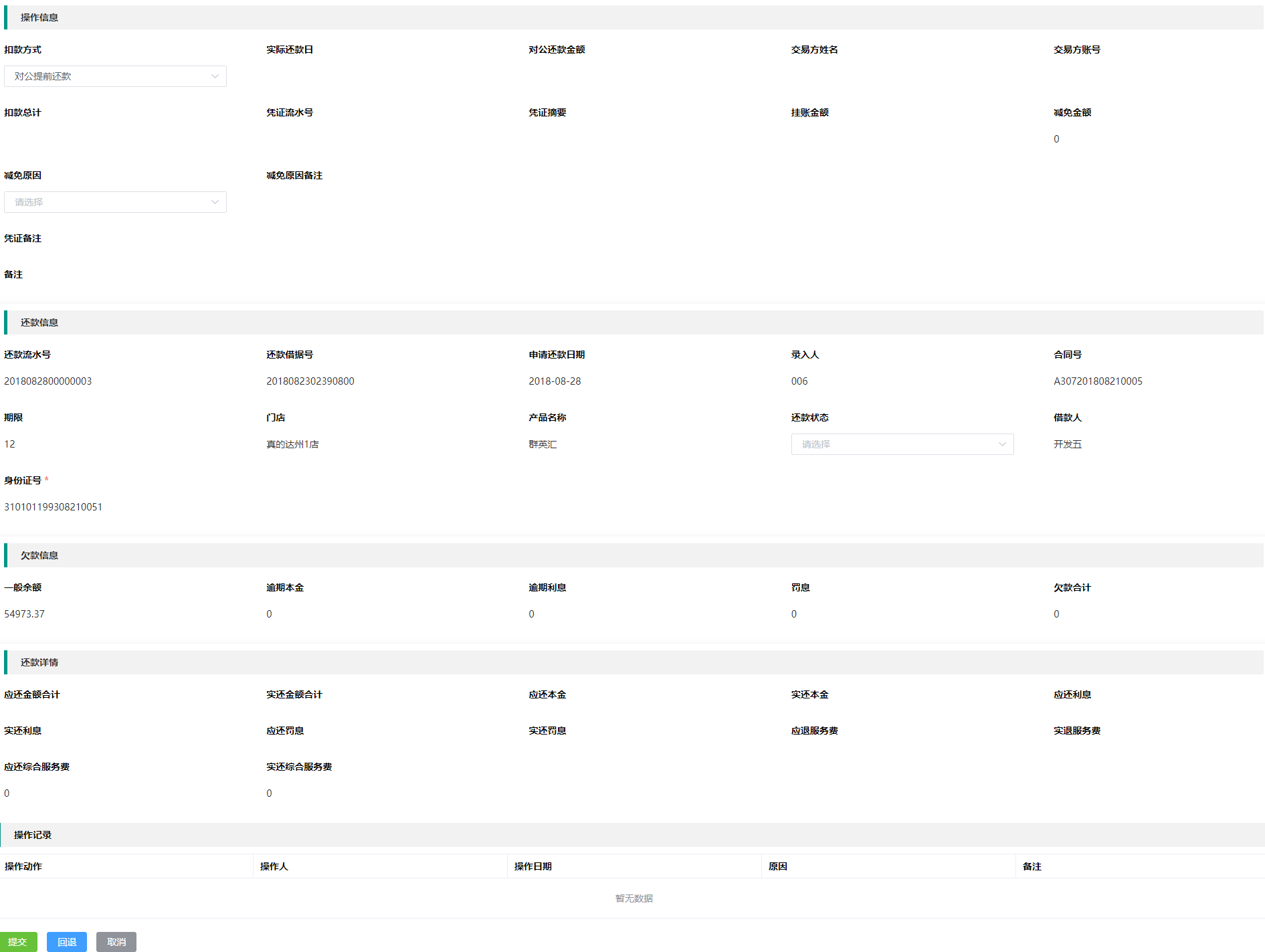
操作流程为,点击编号,进入详情页
优点:
- 页面构建采用JSON,动态构建,前期敏捷开发很快.
- 页面渲染根据schemaData.json来渲染,form-panel组件初始化加载schemaData.json,动态解析schemaData.json内的data下的,map值,model来填充值.
缺点:
- 缺少灵活机动性,快速构建的基础需要在formPanel组件内包含,否则需要重新定义
- 下拉菜单的值,建议使用静态数组
# START
# step 1
//首先引入
import FormPanel from "@/components/FormPanel/FormPanel";
# step 2
//使用formPanel组件并塞入数据
 <form-panel ref="saveAct"  class="navSection"
                    v-for="(key, value, index) in schemaDataAll"
                    :key="index" :schemaData="key"
                     :modelData="modelDataAll[value]"
                     :formKey="value"
                     >
  </form-panel>
-- 注意 -- 需要注意的是这里的schemaDataAll是一个二维数组,因为详情页有模块划分,所以是二维数组。如下 PS: colSpan 一行的总列数为24列
mock JSON
{
  "msg": "成功",
  "code": "0000",
  "data": {
    "operationMessage": { //模块名称
      "isAnchor": true, //是否锚记
      "type": "commonform", //常规的类型,simpleTable || commonform
      //simpleTable 为简单表格,但是因为现在数据后端切分,故基本不启用了
      "formTitle": "操作信息",//模块title
      "titleButtons": [], //预留的保存按钮位置
      "fields": [{ //字段JSON
        "model": "payType",//表单内的model
        "orderNum": 1,//排列位置
        "type": "select", //下拉菜单类型
        "colSpan": 5,//占用页面的宽度比例
        "disabled": false,//不禁用 == 可编辑
        "required": true,//必填
        "label": "扣款方式",//显示的title label
        "labelPosition": "left" //label 显示的位置
      }]
    },
    "refundMessage": {
      "isAnchor": true,
      "type": "commonform",
      "formTitle": "还款信息",
      "titleButtons": [],
      "fields": [{
        "model": "serialNo",
        "orderNum": 1,
        "type": "text",// 文本框
        "colSpan": 5,
        "disabled": true,//因禁用了编辑功能,故此处为 span 仅显示
        "label": "还款流水号",
        "required": true
      }]
    },
    "refundDetail": {
      "isAnchor": true,
      "type": "commonform",
      "formTitle": "还款详情",
      "titleButtons": [],
      "fields": [{
        "model": "payAmount",
        "orderNum": 1,
        "type": "text",
        "colSpan": 5,
        "disabled": true,
        "required": true,
        "label": "应还金额合计",
        "labelPosition": "top"
      }]
    }
  }
}
# step3
此外你还需要额外的操作按钮,弹出层 某些功能还会嵌套表格 表格和上面的步骤一样,此处不做赘述!
      <!-- 按钮 -->
      <el-row class="btnBox">
          <el-button  size="mini" type="success" @click="recheckPendingDetaileSubmit">
              提交
          </el-button>
          <el-button  size="mini" type="primary" @click="applyDetailReturn">
              回退
          </el-button>
          <el-button  size="mini" type="info" @click="applyDetailCancel">
              取消
          </el-button>
      </el-row>

      <!-- 取消,回退弹框 -->
        <el-dialog title="取消" :visible.sync="dialogFormVisible" class="dialogStyle">
          <el-form :model="form">
            <el-form-item label="主原因" :label-width="formLabelWidth" >
              <el-select v-model="form.primaryCause" placeholder="请选择活动区域" :visible-change="downBoxShow" @change="gainSecondaryCause()">
                <el-option v-for="(primaryList,index) in primaryCauseList" :key="index" :value="primaryList.ItemNo" :label="primaryList.ItemName"></el-option>
              </el-select>
            </el-form-item>
            <el-form-item label="子原因" :label-width="formLabelWidth">
              <el-select v-model="form.secondaryCause" placeholder="请选择活动区域">
              <el-option v-for="(secondaryList,index) in secondaryCauseList" :key="index" :value="secondaryList.ItemNo" :label="secondaryList.ItemName"></el-option>
              </el-select>
            </el-form-item>
            <el-form-item label="备注" :label-width="formLabelWidth">
              <el-input type="textarea" v-model="form.remark"></el-input>
            </el-form-item>
          </el-form>
          <div slot="footer" class="dialog-footer">
            <el-button type="primary" @click="applyCancelSure">确 定</el-button>
          </div>
        </el-dialog>
注意 因取消回退按钮共用一个接口,故写在了一起
# javascript部分
import FormPanel from "@/components/FormPanel/FormPanel";//引用公用组件
import schemaData from "./json/schemaData.json";//详情页构成的JSON
// import carInfo from "./json/getCarInfo.json";//mockJSON
import tableLabel from "./json/operationLable"//表格构成的JSON
import cloneDeep from 'lodash/cloneDeep'//深拷贝
import { recheckPending_Detail , recheckPendingDetail_operationLable , recheckPending_Submit , recheckPending_Cancel , recheckPending_return } from "@/api/beforeRepayment/personalLoan";//axios接口方法
import { acquire_primaryCause, acquire_secondaryCause ,applyPendingDetail_sure} from '@/api/beforeRepayment/consumeFinance'//axios接口方法

export default {
  components: { FormPanel },
  data() {//初始化值
    return {
      schemaDataAll: "",
      modelDataAll: "",
      detailParam: {
        serialNo:this.$route.params.serialNo,//取出路由传递的参数
        phaseNo:this.$route.params.phaseNo,
        // serialNo: "2018071000000040",
        // phaseNo: "0020"
      },
      operationLableParam: {
        serialNo:this.$route.params.serialNo,
        flowNo:this.$route.params.flowNo,
        // serialNo: "2018071000000038",
        // flowNo: "HX0900"
      },
      tableLables: cloneDeep(tableLabel),
      operationLable: [],
      submitParams:{},
      dialogFormVisible:false,
      form: {
        primaryCause:'',
        secondaryCause:'',
        remark:'',
      },
      formLabelWidth: '120px',
      primaryCauseList: [],
      secondaryCauseList: [],
      cancelParams:this.$route.params,
      cancelResult:{},
      primaryCauseParam: {},
      secondaryCauseParam: {},
      cancelSureParam:{},
      downBoxShow:false,
      actTitleName:''
    };
  },
  created() {//页面构建的时候,执行的方法
    this.initSchema();//请求表单数据的方法
    this.initData();//请求表格数据的方法
    console.log(this.$route.params);
  },
  methods: {
    //获取页面构成+样式
    initSchema: function() {
      const schemaJson = schemaData.data;
      this.schemaDataAll = schemaJson;
    },
    initData: function() {
    //获取表单数据
      recheckPending_Detail(this.detailParam).then(response => {
        console.log(response.data);
        if ((response.code == '0000')) {
          this.modelDataAll = response.data;//塞到modelDataAll内
        }
      });
    // 获取操作列表表格数据
      recheckPendingDetail_operationLable(this.operationLableParam).then(response => {
        console.log(response.data);
        if ((response.code == '0000')) {
            this.operationLable =  response.data//塞到operationLable内
        }
      })
    },
    // 提交
    recheckPendingDetaileSubmit(){
      // console.log("submit");
      this.submitParams.amraSerialNo = this.$route.params.serialNo;
      this.submitParams.flowSerialNo = this.$route.params.flowSerialNo;
      this.submitParams.payType = this.modelDataAll.operationMessage.payType;
      this.submitParams.objectNo = this.$route.params.objectNo;
      this.submitParams.flowNo = this.$route.params.flowNo;
      recheckPending_Submit(this.submitParams).then(response=>{
          if(response.code == '0000'){
              this.$message({
                message: '提交成功',
                type: 'success'
              });
          }
      })
    },
    // 取消--001
    applyDetailCancel(){
      this.dialogFormVisible = true
      recheckPending_Cancel(this.cancelParams).then(response=>{
        if( response.code == '0000' ){
            this.cancelResult = response.data
            this.cancelResult.flowSerialNo = this.cancelParams.flowSerialNo
            acquire_primaryCause(this.cancelResult).then(response=>{
                if (response.code == '0000') {
                  this.primaryCauseList = response.data.refuseInfo;

                }
            })
        }
      })
    },
    // 回退
    applyDetailReturn(){
      this.dialogFormVisible = true
      recheckPending_return(this.cancelParams).then(response=>{
         if( response.code == '0000' ){
            this.actTitleName = response.data.actName
            this.cancelResult = response.data
            this.cancelResult.flowSerialNo = this.cancelParams.flowSerialNo
            acquire_primaryCause(this.cancelResult).then(response=>{
                if (response.code == '0000') {
                  this.primaryCauseList = response.data.refuseInfo;
                }
            })
         }
      })
    },
    // 子原因
    gainSecondaryCause(){
        this.secondaryCauseParam.flowSerialNo = this.$route.params.flowSerialNo;
        this.secondaryCauseParam.actName = this.cancelResult.actName;
        this.secondaryCauseParam.mainReson = this.form.primaryCause;

        acquire_secondaryCause(this.secondaryCauseParam).then(response => {
          if (response.code == '0000') {
            this.secondaryCauseList = response.data.subRefuseInfo;
            console.log(this.secondaryCauseList);
            console.log(this.downBoxShow)
          }
        })
    },


    // 取消-回退-确定
    applyCancelSure(){
      this.cancelSureParam.flowSerialNo = this.$route.params.flowSerialNo;
      this.cancelSureParam.actName = this.cancelResult.actName;
      this.cancelSureParam.mainReson = this.form.primaryCause;
      this.cancelSureParam.subReason = this.form.secondaryCause;
      this.cancelSureParam.remark = this.form.remark;
      applyPendingDetail_sure(this.cancelSureParam).then(response => {
        if (response.code == '0000') {
          this.$message({
            message: response.message,
            type: 'success'
          });
          this.dialogFormVisible = false
        }
      })
    }
  }
};
# 一个axios方法 如何写?
注意 因为ERP项目都很庞大,所以我们尽量规范化,文件夹会比较多,SO , 你需要先新建你接口的文件夹,子文件夹,文件,一切按照之前接口约定好的! 此处拿 recheckPending_Detail 这个方法 做例子
axios接口 文件存放位置
huaxia-p2p-loanafter-web\src\api\beforeRepayment\personalLoan.js
script代码
//引入
import { recheckPending_Detail } from "@/api/beforeRepayment/personalLoan";
//申明接收数据的DATA
export default {
  components: { FormPanel },
  data() {
    return {
      schemaDataAll: "",
      modelDataAll: "",
    };
  },
  created() {
    this.initSchema();
    this.initData();
    console.log(this.$route.params);
  },
  methods: {
    //获取样式
    initSchema: function() {
      const schemaJson = schemaData.data;
      this.schemaDataAll = schemaJson;
    },
    initData: function() {
	      //获取表单数据
	      recheckPending_Detail(this.detailParam).then(response => {
	        console.log(response.data);
	        if ((response.code == '0000')) {
	          this.modelDataAll = response.data;
	        }
	      });
	    }
    }
};
以上 谢谢观看 !