 huaxia-HelloWorld
# Welcome to huaxia-HelloWorld
上面已经充分的介绍了前端项目的构建了,现在来着手构建一个Hello World
# 列表页 start
# step0
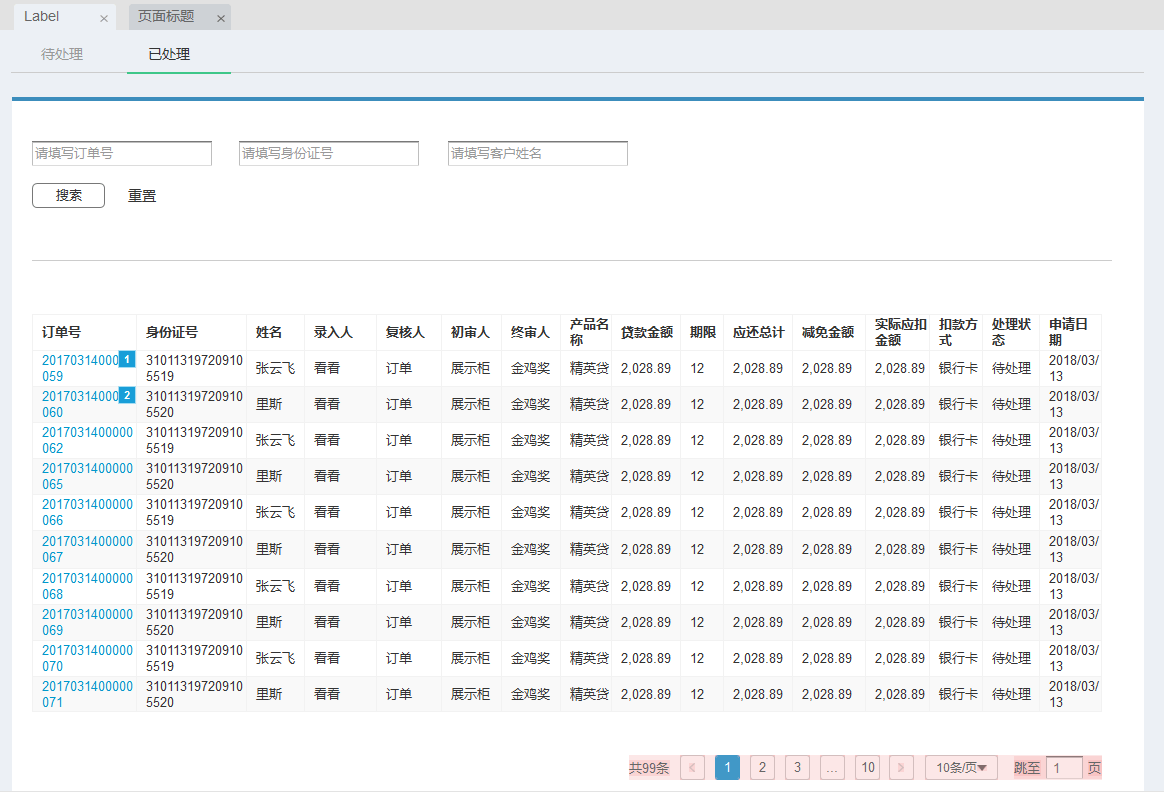
原型图---消金提前还款申请-已处理
# step1
新建页面构建的JSON和API接口
tableLable.js
export default [
   { 'code': 'orderNo', 'lable': '合同号', 'linked': true, 'width': '230px' },
   { 'code': 'certId', 'lable': '身份证号', 'width': '200px' },
   { 'code': 'customerName', 'lable': '客户姓名', 'width': '160px'},
   { 'code': 'inputUser1', 'lable': '录入人', 'width': '160px' },
   { 'code': 'inputUser1', 'lable': '复核人', 'width': '160px' },
   { 'code': 'praeiudiciumUser1', 'lable': '初审人', 'width': '160px' },
   { 'code': 'finalJudgmentUser1', 'lable': '终审人', 'width': '160px' },
   { 'code': 'businessType', 'lable': '产品名称', 'width': '160px' },
   { 'code': 'businessSum', 'lable': '贷款金额', 'width': '160px' },
   { 'code': 'loanTerm', 'lable': '期限', 'width': '160px' },
   { 'code': 'payAmount', 'lable': '应还总计', 'width': '160px' },
   { 'code': 'applyReduceSum', 'lable': '减免金额', 'width': '160px' },
   { 'code': 'payFeeAmt104', 'lable': '实际应扣金额', 'width': '160px' },
   { 'code': 'payType', 'lable': '扣款方式', 'width': '160px' },
   { 'code': 'status', 'lable': '处理状态', 'width': '160px' },
]
searchLabel.js
export default [
   { 'column': 'orderNo', 'lable': '合同编号', 'linked': true, 'width': '250px' },
   { 'column': 'certId', 'lable': '身份证号', 'width': '200px' },
   { 'column': 'customerName', 'lable': '姓名' },
]
API 接口
\* hello.js *\
import request from  '@/utils/request'

export  function  recheckDone_SearchRequest(param) {
	return  request({
		url:  '/xiaojin/tiqian-huankuan/fuhe/history',
		method:  'post',
		data: param
	})
}
# step2
新建vue页面
** hello.vue **
<template>
	<div>
	/* vue 代码块 ...*/
	</div>
</template>

<script>
export  default {
	data() {
		return {
		/* 申明初始的变量 常量 */
			 }
	},
	created() {
		/* 在vue的生命周期中,它是在页面加载之前,有了上面的data的时候,会触发的生命周期 */
		/* 一般适用于初始化获取数据,渲染页面 */
	},
	methods: {
		/* 有了具体的el-DOM and Data之后,在页面处理业务逻辑的时候,指向的方法,此处包括created内调用的方法 */
		/* created 如果和此处方法复用,一般使用this.functionName 调用*/
	}
}
</script>
<style  scoped>
/* 样式书写位置 加入scoped是指 只作用于此页面内,去除掉即可影响所有页面 */
</style>
# step3
下面是完整代码 描述顺序与代码顺序不完全统一 调用组件 使用组件 引入页面构建的JSON 【表格+查询块】 引入接口赋值,写事件,与调试接口
<template>
	<div>
		<hx-table  ref="hxtableComponent"
			:tableItems="tableParam"
			@btn-click="method"
			@selectChange="selectChange"
			@operate-column-click="columnClick">
		</hx-table>
	</div>
</template>

<script>
import HxTable from  '@/components/huaxia/HxTable/queryTableCollection'
import searchLabel from  './json/searchLabel'
import tableLabel from  './json/tableLabel'
import cloneDeep from  'lodash/cloneDeep'
import { recheckDone_SearchRequest } from  '@/api/beforeRepayment/consumeFinance'

export  default {
components: {
	HxTable,
},
data() {
	return {
		tableParam: {
			isShoweds: { // 是否显示集合
			pageIsShow: true, // 分页是否显示
			tableIsShow: 1, // 表格是否显示: 1-显示表格; 0-没有符合搜索条件的单子; 2-队列中没有单子
			isSearch: true, // 搜索框是否显示
			showToolTitle: false,
			isRadio:true,
		},
		pageHelpers: {
		pageSizes: [10, 20, 30, 40, 50, 100], // 每页条数下拉选项
		pageSize: 10, // 每页条数
		totalSum: 10, // 表格数据总数
		currentPage: 1  // 默认当前页
},
	tableLables: cloneDeep(tableLabel),
	tableData: [],
	queryTables: {
		queryParas: cloneDeep(searchLabel),
			param: {
				pageNum: 1,
				pageSize: 10
			}
		}
	},
	contractNumberParams:{
		amraSerialNo:'',
		flowSerialNo:'',
		inputUser:'',
		loanSerialNo:'',
		phaseNo:'',
		objectNo:'',
		objectType:'',
		flowNo:'',
		baSerialNo:'',
		payType:'',
			}
		}
},
created() {
	this.getSearch(this.tableParam.queryTables.param)
},
methods: {
	// queryTable中select的变化
	selectChange(value, currLabel) {
		console.log(value, currLabel)
	},
	/* 弹框中的select变化 */
	dialogSelectChange(value, currLabel) {
		console.log(value, currLabel)
	},
	/* 操作栏点击 */
	columnClick(operateType, param) {
		console.log('操作栏点击')
	},
	method(key, data) {
		switch (key) {
		case  'search': // 搜索事件
			this.getSearch(data)
			console.log(111,data);
			break
		case  'reSet': // 检索重置
			this.tableParam.pageHelpers = {
			pageSizes: [10, 20, 30, 40, 50, 100], // 每页条数下拉选项
			pageSize: 10, // 每页条数
			totalSum: 10, // 表格数据总数
			currentPage: 1  // 默认当前页
			}
			this.tableParam.queryTables.param = {
			pageNum: 1,
			pageSize: 10
			}
			this.getSearch(this.tableParam.queryTables.param)
			break
		case  'current_change': // 当前页数修改
			this.tableParam.pageHelpers.currentPage = data
			this.tableParam.queryTables.param.pageNum = this.tableParam.pageHelpers.currentPage
			this.getSearch(this.tableParam.queryTables.param)
			break
		case  'size_change': // 每页数据条数修改
			this.tableParam.pageHelpers.pageSize = data
			this.tableParam.queryTables.param.pageSize = this.tableParam.pageHelpers.pageSize
			this.getSearch(this.tableParam.queryTables.param)
			break
		case  'contractSerialNo':// 点击合同号
			this.contractNumberData = data;
			this.contractNumberParams.serialNo = this.contractNumberData.serialNo;
			this.contractNumberParams.phaseNo = this.contractNumberData.phaseNo
			this.contractNumberParams.flowNo = this.contractNumberData.flowNo
			// console.log(this.contractNumberParams);
			this.$router.push({name:'beforeRepayment_consumeFinance_recheckDoneDetaile',params: this.contractNumberParams})
			break
		}
	},
	/* 根据条件查找 */
	getSearch(param) {
		console.log(param)
		recheckDone_SearchRequest(param).then(response  => {
		if (response.code ==  '0000') {
			if (response.data.records.length >  0) {
				const array = response.data.records
				this.tableParam.isShoweds.tableIsShow =  1
				this.tableParam.isShoweds.pageIsShow =  true
				this.tableParam.tableData = array
				this.tableParam.pageHelpers.totalSum = response.data.total
				} else {
				this.tableParam.isShoweds.tableIsShow =  2
				this.tableParam.isShoweds.pageIsShow =  false
				}
			}
		})
	}
	}
}
</script>
<style  scoped>
</style>
# step4
配置路由地址
1 打开 huaxia-HelloWorld\src\router\index.js
export const constantRouterMap = [
	{ path:  '/404', component: () => import('@/views/404'),  hidden: true },
	{ path:  '/',
		component: () => import('@/views/list'),
		name:  'list',
		meta: {  title:  '样例',  icon:  'form' }
	},
	{
	path:  '/hello',
	component: () => import('@/views/demo/hello'),
	name:  'demo',
	meta: {  title:  'HelloWord',  icon:  'form' },
	}
]
2 打开 huaxia-HelloWorld\src\views\list.vue
<div  class='firstTitle'>--------------HelloWord----------------------</div>

<li  class='secondTitle'  style='color:red'>
	<router-link  :to="{path:'/hello'}">hello</router-link>
</li>
# step5
预览效果 成功效果
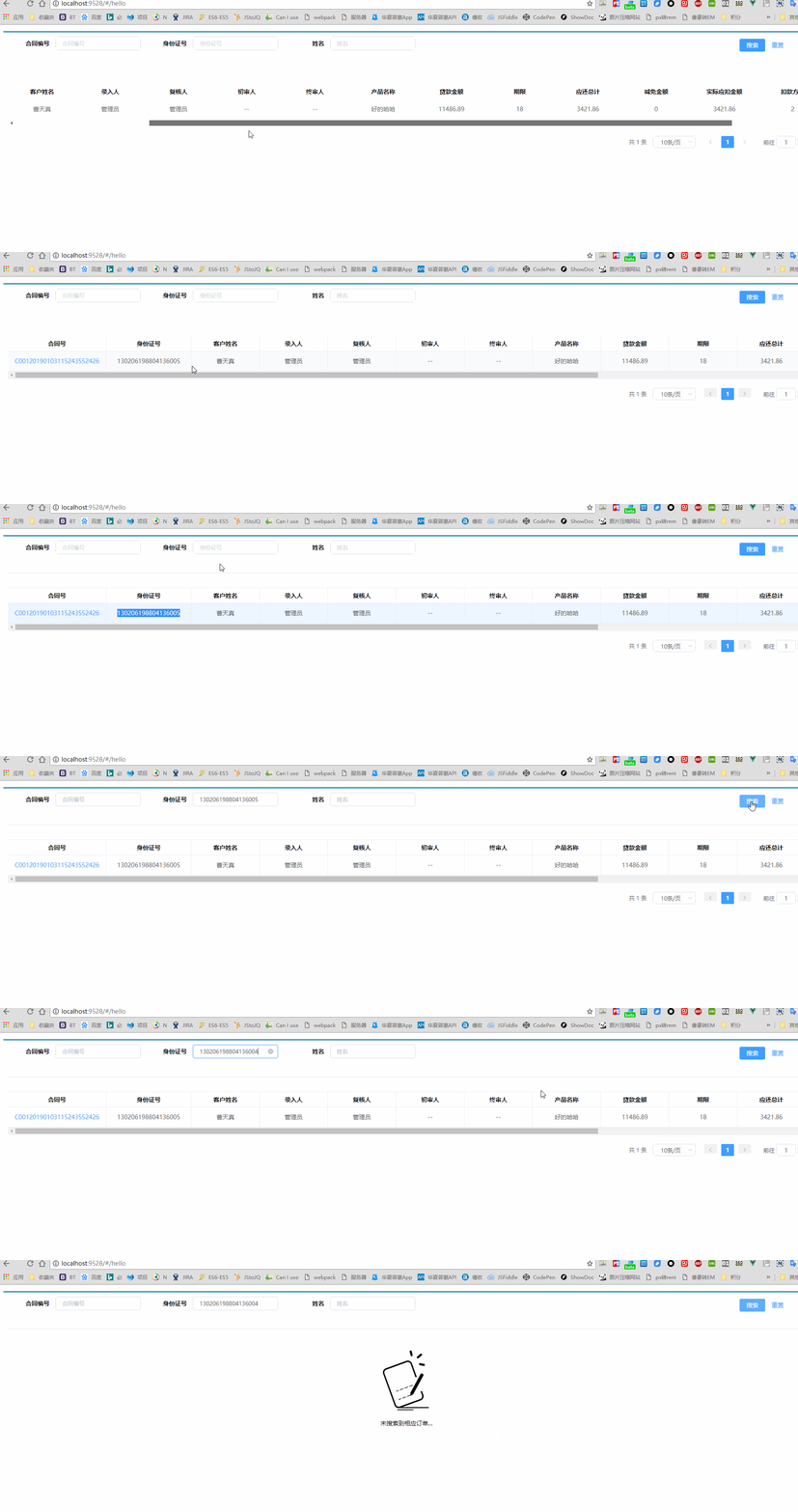
后端服务问题

以上 谢谢观看 !
修改页面 (opens new window)
Last Updated: 12/20/2021, 5:53:52 AM