 后端模板组件 · FormPanel
# 后端模板组件 · FormPanel
# 前言
# FormPanel是什么?
产品来源于抽象了公司的详情页 基于element-ui ,包含了 详情页面的 展示和编辑功能 有col-span 栅格化 内嵌actButton 单层表单逻辑处理 此文档针对于FormPanel 的学习
# 1. FormPanel 组件的结构是什么样?
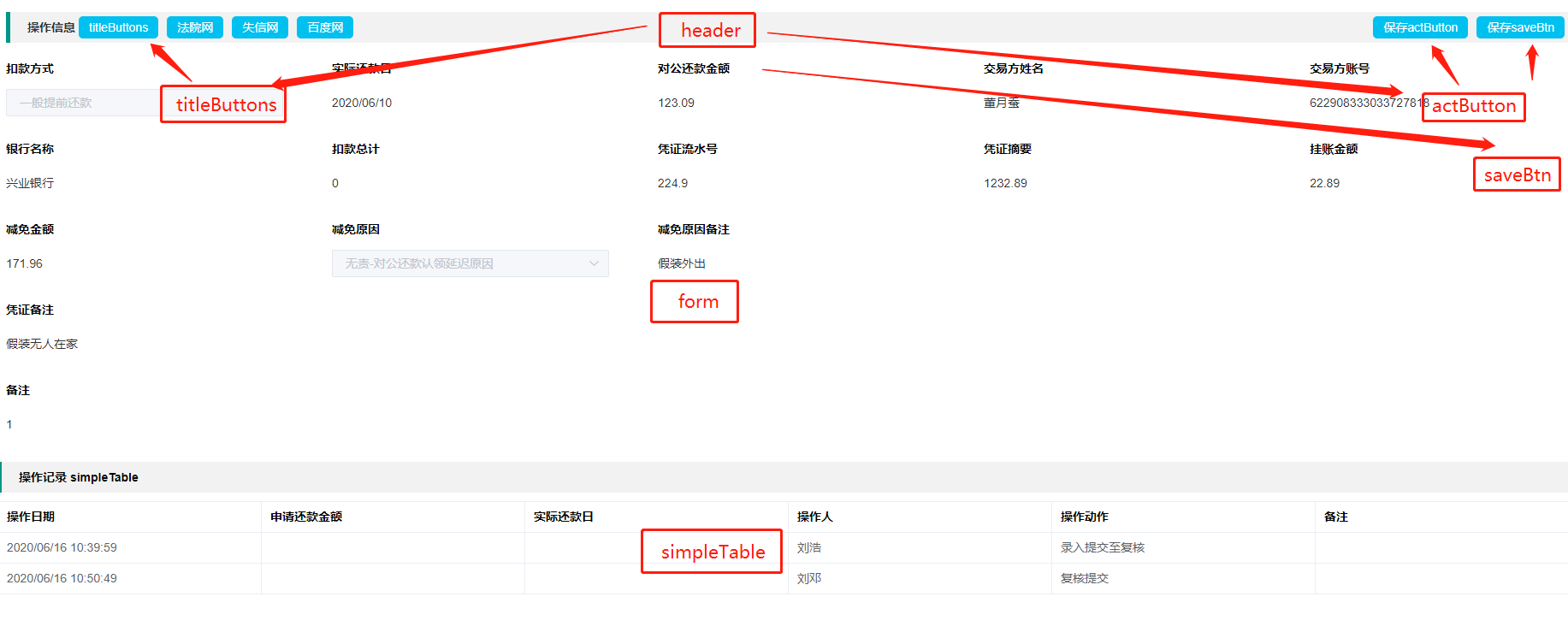
FormPanel 由 header || form || simpleTable 三个小组件构成【如上图】
Header 类似详情页的大标题以及基本操作按钮
- header :包含了title 和三种类型的 按钮slot ; -- titleButtons 靠title 左侧的按钮,一般用于调用&跳转第三方的按钮 -- actButton 多按钮 泛指多种操作 也包含保存 -- saveBtn 保存按钮 此按钮的意义是小保存 在某个长的业务逻辑内的某一个小流程的小保存类似暂存
-- Form类似表单的工厂,塞入JSON 得到基础表单
- form 包含 【this.schemaDt.type==='commonform'才渲染】 -- hidden 隐藏的属性 colSpan决定是否占位 -- warning :红色星号 -- text :属性warnShow文本或输入框加星号 -- number:数值类型 -- select :下拉框 返回数据需要额外增加 "payType":"3","payTypeList": [{"value": 1","label": "对公一般还款"}] -- radio :单选框控件 值来自 globDictData['selectCode'] globDictData.js:全局的单选复选数据集合 -- checkbox :多选框控件 值来自 globDictData['selectCode'] -- area :详情页的单纯展示字符串 -- textarea :多行文本框 -- date:日期 -- datetime:时间日期 -- datetimeWarning:带星号的红色日期时间选择框 -- homePhone: 固定电话控件,默认展示两个输入框 5位-10位 -- companyPhone:公司电话 三段位 5-10-5位 -- areaCity + prodParentSelect + childParentSelect:省市区级联 --无手机号的原因是因为所有用户登录都是用的手机号和身份证
SimpleTable 类似一个表单内有一个简单的表格展示数据 使用率较小
- simpleTable 【this.schemaDt.type==='simpleTable'才渲染】 -- 此组件是HxTable的简单版本 请先暂时跳过,由第二篇专门的介绍
# 2. 构成页面的数据长啥样? --- schemaData .json
此JSON 由于过长,做了部分缩减
	{"msg": "成功",
 		"code": "0000",
		"data": {
	    		"operationalInfo": {
						"isAnchor": true,
						"type": "commonform",
						"formTitle": "操作信息 -header",
						"titleButtons": [{"key": "gongshang","value": "titleButtons"}, {"key": "fayuan","value": "法院网"}],
						"actButton":[{"key":"indInfoVo","value":"保存actButton"}],
						"saveBtn": [{"key": "saveBtn","value": "保存saveBtn"}],
						"fields": [{
						"model": "payType",
						"orderNum": 1,
						"type": "select",
						"colSpan": 5,
						"disabled": true,
						"required": true,
						"label": "扣款方式",
						"labelPosition": "top"
						}, {
						"model": "inputDate",
						"orderNum": 2,
						"type": "text",
						"colSpan": 5,
						"disabled": true,
						"required": true,
						"label": "实际还款日",
						"labelPosition": "top"
						}, {
						"model": "payamountSubAmt",
						"orderNum": 3,
						"type": "text",
						"colSpan": 5,
						"disabled": true,
						"required": true,
						"label": "对公还款金额",
						"labelPosition": "top"
						}, {
						"model": "tranderName",
						"orderNum": 4,
						"type": "text",
						"colSpan": 5,
						"disabled": true,
						"required": true,
						"label": "交易方姓名",
						"labelPosition": "top"
						}, {
						"model": "tranderAccount",
						"orderNum": 5,
						"type": "text",
						"colSpan": 4,
						"disabled": true,
						"required": true,
						"label": "交易方账号",
						"labelPosition": "top"
						}, {
						"model": "tranderBankName",
						"orderNum": 6,
						"type": "text",
						"colSpan": 5,
						"disabled": true,
						"required": true,
						"label": "银行名称",
						"labelPosition": "top"
						}, {
						"model": "deductAmount",
						"orderNum": 7,
						"type": "text",
						"colSpan": 5,
						"disabled": true,
						"required": true,
						"label": "扣款总计",
						"labelPosition": "top"
						}, {
						"model": "voucherSerialNo",
						"orderNum": 8,
						"type": "text",
						"colSpan": 5,
						"disabled": true,
						"required": true,
						"label": "凭证流水号",
						"labelPosition": "top"
						}, {
						"model": "voucherAbstract",
						"orderNum": 9,
						"type": "text",
						"colSpan": 5,
						"disabled": true,
						"required": true,
						"label": "凭证摘要",
						"labelPosition": "top"
						}, {
						"model": "reduceReason",
						"orderNum": 12,
						"type": "select",
						"colSpan": 5,
						"disabled": true,
						"required": true,
						"label": "减免原因",
						"labelPosition": "top"
						}]
						}
		    		"accountInfo" : {
					"isAnchor": false,
					"type": "simpleTable",
					"formTitle": "交易明细",
					"titleButtons": [],
					"actButton": [],
					"fields" :[
						{"prop":"loanSerialNo","label":"借据号"},
						{"prop":"applyDate","label":"交易日期"},
						{"prop":"accountDate","label":"记账日期"},
						{"prop":"deductType","label":"交易类型"},
						{"prop":"actualPayamt","label":"交易金额"},
						{"prop":"inputUser","label":"操作人"},
						{"prop":"inputDate","label":"操作日期"}
					]
				},`
# 3. 最简单的FormPanel,怎么写?
# 3.1 引入组件
import FormPanel from  "@/components/FormPanel/FormPanel"; // 组件
import schemaData from  "./json/schemaData.json"; // 组件的结构JSON
# 3.2 向组件插入数据
<form-panel  ref="saveAct"  class="navSection"
v-for="(key, value, index) in schemaDataAll"
:key="index"  :schemaData="key"
:modelData="modelDataAll[value]"
:formKey="value"></form-panel>
参数解释 schemaDataAll 是上面的JSON, (key, value, index) == item ,itemName , 下标 modelData 是 schemaDataAll[itemName] 原因是 多个formPanel 解析就不需要多次申明
// 类似
<form-panel  ref="saveAct"  class="navSection"	:key="index"
schemaData="schemaData.operationalInfo"
:modelData="modelDataAll['operationalInfo']"
:formKey="value"></form-panel>
<form-panel  ref="saveAct"  class="navSection"	:key="index"
schemaData="schemaData.indInfo"
:modelData="modelDataAll['indInfo']"
:formKey="value"></form-panel>
# 3.3 定义基础的公共参数的集合 store/modules/glabdatas.js
这部分JSON会在项目开始之初建立好,并且逐步完善 删减了部分 ,作用是 填充多选的 单选的值
    const hxconst = {
		state: {
				globDictData: {
				"car300EditFlag": true,
				"unitType": [{ "value": "01", "label": "政府机关" }, { "value": "02", "label": "事业单位" }, { "value": "03", "label": "国企" }, { "value": "04", "label": "外企" }, { "value": "05", "label": "合资" }, { "value": "06", "label": "民营" }, { "value": "07", "label": "私企" }, { "value": "08", "label": "个体" }],
				"industryType" : [{ "value": "01", "label": "政府机关" }, { "value": "02", "label": "军事机关" }, { "value": "03", "label": "教育、科研、设计机构" }, { "value": "04", "label": "传媒、文化体育" }, { "value": "05", "label": "高新技术" }, { "value": "06", "label": "建筑业" }, { "value": "07", "label": "制造业" }, { "value": "08", "label": "金融" }, { "value": "09", "label": "服务" }, { "value": "10", "label": "零售、商贸、企业" }, { "value": "11", "label": "公共事业" }, { "value": "12", "label": "医院" }],
				"supportOrChildNumber": [{ "value": "01", "label": "0人" }, { "value": "02", "label": "1人" }, { "value": "03", "label": "2人" }, { "value": "04", "label": "3人以上" }],
				"positionLevel": [{ "value": "01", "label": "普通职员" }, { "value": "02", "label": "中层管理" }, { "value": "03", "label": "高层管理" }],
				"education": [{ "value": "01", "label": "硕士及以上" }, { "value": "02", "label": "本科" }, { "value": "03", "label": "大专" }, { "value": "04", "label": "中专" }, { "value": "05", "label": "高中" }, { "value": "06", "label": "初中及以下" }],
				"liveType": [{ "value": "01", "label": "商业按揭" }, { "value": "02", "label": "公积金按揭" }, { "value": "03", "label": "商业/公积金组合按揭" }, { "value": "04", "label": "无按揭购房" }, { "value": "05", "label": "自建房" }, { "value": "06", "label": "租房" }, { "value": "07", "label": "与父母同住" }, { "value": "08", "label": "亲戚住房" }, { "value": "09", "label": "临时居住" }, { "value": "10", "label": "单位宿舍" }],
				"yesOrNo": [{ "value": "1", "label": "是" }, { "value": "0", "label": "否" }]
				},
				mutations: {},
				actions: {},
				getters: {}
				 }
			}

export default hxconst
# 4. 那真实的实例页面代码是什么样?
<template>
	<div>
		<form-panel  ref="saveAct"  class="navSection"
		v-for="(key, value, index) in schemaDataAll"
		:key="index"  :schemaData="key"
		:modelData="modelDataAll[value]"
		:formKey="value"></form-panel>
	</div>
</template>


<script>
import FormPanel from  "@/components/FormPanel/FormPanel"; // 引入组件
import shemaData from  "./json/schemaData.json"; // 引入组件构成的JSON
import cloneDeep from  'lodash/cloneDeep'; // 深拷贝对象
import tableLabel from  "./json/operationLable.js" //表格的构成
// 请求接口
import { detailCreated_SearchRequest , detailCreated_operationLable } from  '@/api/hello.js'

export  default {
components: { FormPanel },
	data() {
		return {
			schemaDataAll: [],// 所有的form的schemaData
			operationLable:[],
			detailparams:cloneDeep(this.$route.params.contractNumberParams), //查询参数
			tableLables: cloneDeep(tableLabel)
		};
	},
	mounted() {
		this.$nextTick(()=>{
			this.initSchema() // 初始化页面结构
			this.initData()   // 填充页面数据
		})
	},
	methods: {
		//获取样式
		//也可以直接通过服务器控制
		initSchema: function() {
			const schemaJson = schemaData.data;
			this.schemaDataAll = schemaJson;
		},

	//获取数据
	initData: function() {
		// 详情信息 表单数据填充
		let _this = this
		detailCreated_SearchRequest(this.detailparams).then(res  => {
			if (res.code ==  "20000") {
				console.log('resdata',res.data);
				_this.modelDataAll = res.data
			} else {
				this.$message.error('网络繁忙,请稍后再试!')
			}
		})

		//操作列表 表格数据填充
		detailCreated_operationLable(this.operationLableParam).then(res  => {
			if ((res.code ==  "20000")) {
				this.operationLable = res.data
			}
			})
		},
		// Header 按钮操作方法
		titleButtonClick : function(e, key){
					window.open(key, '_blank')
		},
		//动作按钮功能
		measureClick: function(type, e, key){
			// console.log(type,e,key);
			this.$emit("calculte", key, e, type);
		},
		// 保存按钮功能 因为内部嵌套很多 暂存所以逻辑很复杂
		// 实际使用建议结合自身业务做删改
		onButtonClick : function(type, e, key){
		    // 1秒内禁止多次保存
			let nowSecond =  new Date().getTime() /  1000;
			let delta = (nowSecond - this.buttonClickTimeSecond);
			if(delta >=0  && delta <=1){
				this.$info("onButtonClick: forbid double click in one second. return.");
					return;
				}
			this.buttonClickTimeSecond = nowSecond;
		/** 保存按钮 */
			if('commonform'  === this.formType){
				let flag =  true;
				const areaselRef = this.$refs['areaselform'];
				if(areaselRef) {
					if(areaselRef instanceof Array) {
						for(let i=0; i < areaselRef.length; i++) {
							const areaselvalid = areaselRef[i].validate();
							if(!areaselvalid) {
								flag =  false;
							}
						}
					} else {
						const areaselvalid = areaselRef.validate();
							if(!areaselvalid) {
							flag =  false;
							}
					}
		}
		this.$refs[type].validate((valid) => {
			if (valid && flag) {
				this.$emit("btnClick", key, e, this.modelDt)
			} else {
				//console.log('表单校验不通过!!');
			}
		});
		}else  if('contact'  === this.formType&&'phoneVeriDownload'!=key){ //联系人信息
			let myValid = this.$refs.contactInfo.validate();
				if(!myValid){
					this.$info("contact validate results false. return.");
					return;
			}
			const resDt = this.$refs.contactInfo.getValue()
			if(!resDt){
				this.$info("contact validate results false. return.");
				return;
			}
				this.$emit("btnClick", key, e, ((resDt && resDt.length>0) ? resDt:  null) )
			}else  if('remark'  === this.formType){ //备注
				const resDt = this.$refs.remarkInfoRef.getValue()
				this.$emit("btnClick", key, e, resDt)
			}else  if('professionInfo'  === this.formType){ //职业信息
				const resDt = this.$refs.professionInfo.getValue()
				this.$emit("btnClick", key, e, resDt)
			}else  if('simpleTable'===this.formType){
				this.$emit("btnClick", key, e, key)
			}else  if(key ==  'downloadPhoneList'){
				this.$refs.phoneVerificationRef.showDownloadList();
			}else  if(key ==  'phoneVeriDownload'){
				this.$emit("btnClick", key, e, type);
			}else{
				this.$emit("btnClick", key, e, type);
			}
		},
	}
};
</script>
# 5. 结语
使用formPanel 组件
在你的页面 需要
- 引入填充单选多选的JSON字符串
- 引入页面构成的JSON字符串
- 引入formPanel 组件
- 引入axios请求接口
- 填充请求回来的数据
- 编写页面处理逻辑
以上 谢谢观看 !
修改页面 (opens new window)
Last Updated: 12/20/2021, 5:53:52 AM